Troubleshooting IQFeed
By Dave Mabe
Pre-S: I'll be on the B The Trader podcast soon. There's a "submit a question" segment where I'll be answering questions from listeners. If you have any questions, submit them here. Thanks!
Occasionally, you'll run into a frustrating issue with IQFeed and Amibroker where the backfill in an exploration hangs and never completes.
Sometimes this is solved simply by clicking the stop button and restarting the exploration manually.
Other times I've seen it get caught in the same place on multiple attempts.
This can be extremely frustrating as you see profitable trades pass you by because of this problem.
At first glance, the entire IQFeed/Amibroker integration seems like a black box, but when you dig a little, there are some nice tools to see what's going on and actually troubleshoot.
The first place to check is the hidden backfill status window alongside Amibroker in the task bar.
Bring it up, then click the Details button.
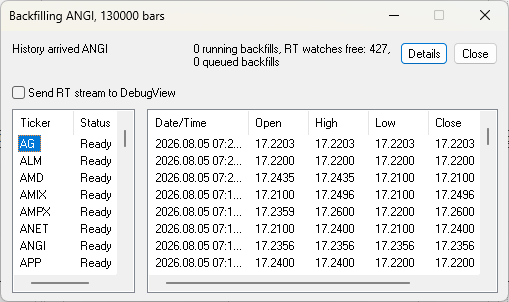
This gives you a list of the backfills and real-time "watches" (L1 feeds) that are occurring.
Click a symbol to view the received data (I selected AG in the image above).
Scroll down through the tickers - the status of Ready is good.
When the backfill is stuck, often you can narrow it down to a single ticker with a status of Backfilling that's causing the issue.
But how can you know when it's started hanging when you're running it in Auto-repeat mode in real-time trading?
This is an ideal use case for the dead-man timer I mentioned recently.
More tomorrow and further troubleshooting steps if you need to dig even deeper.
-Dave
P.S. Tired of hesitating for one second and missing the entire move? Get confident in your trading using MabeKit. Get Instant Access