Increase Max Number of Bars in Amibroker
By Dave Mabe
When I install Amibroker on a new computer, there are a few steps that I take immediately.
But the very first one is something simple, but it unlocks a key capability for my backtesting.
By default, Amibroker allows up to one million bars per symbol in the local database when using IQFeed to import data.
(Important note, this limit doesn't apply if you're "manually" importing data from, say, Polygon. It only applies if you're using a plug-in like IQFeed or eSignal to backfill your data.)
In the Database Settings, it tells you that corresponds to 8 years of 1-minute bar data per symbol (in reality, it's less than that when you include all pre- and post-market data).
When you try to put a number larger than 1 million in that field, Amibroker gives you an error message.
However, there's a way to modify it to allow larger numbers for this setting.
(Warning - it involves making a change to the Windows Registry, which you should always do very carefully.)
Bring up the Registry Editor from the Start menu in Windows. (Type registry when the Start menu is in focus.)
Navigate to the following registry key:
HKEY_CURRENT_USER\Software\TJP\Broker\SettingsRight-click on the Settings folder and choose New -> DWORD (32 bit) Value.
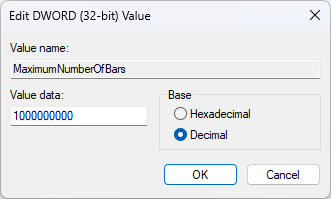
For the name of the value, use MaximumNumberOfBars.
For the Value data field, choose Decimal for the Base radio button and enter a value higher than 1 million.
I use 1000000000 for the value, so I never run into the limitation:
With that set, I can use a much larger value for the Number of bars field in my backtesting database:
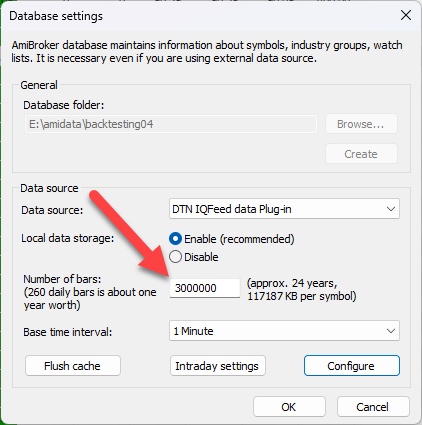
With a value of 3000000, I have data all the way back to 2008 for AAPL.
That allows me to backtest using a much larger window, if I so choose.
-Dave
P.S. Afraid to size up because you don’t trust your edge? Build confidence to trade your strategy with bigger size with MabeKit.