How to Tell Amibroker to Assume Unlimited Buying Power
By Dave Mabe
The first thing you should do in Amibroker when you create a new strategy is to configure the backtest to use unlimited buying power.
It's not that you have unlimited resources to trade - it's that you don't want your backtester to exclude trades from your backtest prematurely.
At the beginning of the process of creating a profitable trading strategy, you need to include all the trades - even if you don't have enough buying power in your live account to trade them all.
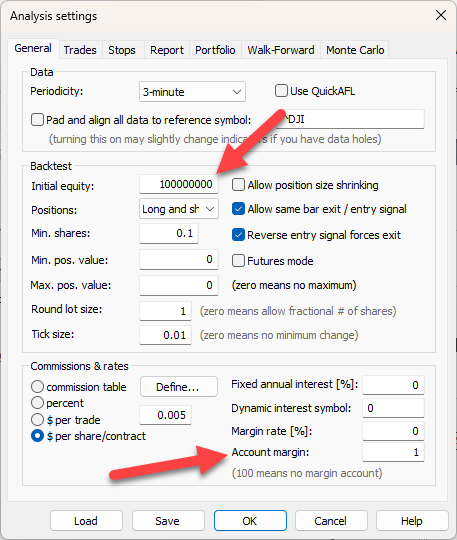
Here are the settings in Amibroker to do this. On the General tab:
Set Initial equity to a large number.
Set Account margin to 1.
On the Portfolio tab:
Set Max. Open Positions to a large number.
Set the Limit trade size as % of entry bar volume to 0.
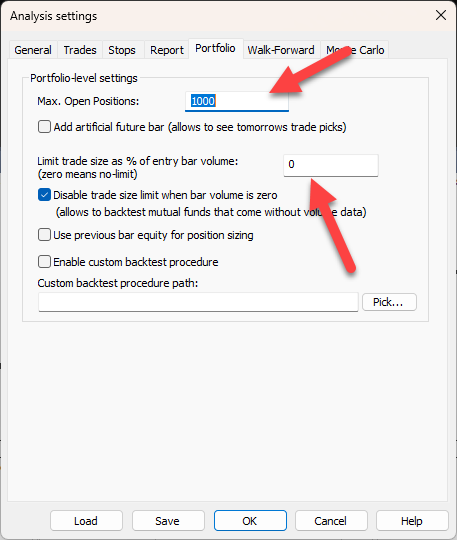
This tells Amibroker to basically "take all the trades" so you have a useful backtest to use as a starting point.
-Dave
P.S. Wish you could backtest your ideas - without spending months learning to code? Run your first backtest in an afternoon using my Amibroker AFL Course. Get Instant Access