How To Exclude ETFs from a Strategy
By Dave Mabe
Yesterday, I shared ways to consider whether to include or exclude ETFs in your trading strategy.
Here's how you can identify ETFs and treat them as a group so you can treat them differently.
In Trade-Ideas, there's a globally available symbol list of ETFs you can use to exclude from either an alert window or top list, like this:
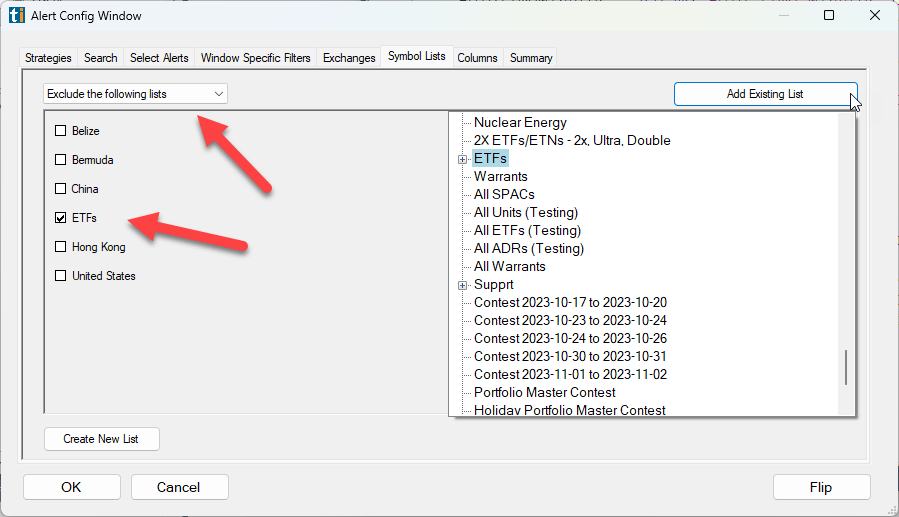
The list is maintained nightly as more and more ETFs are added.
The logic used for the list is not perfect (unless it's changed since I left), but it's good enough for most purposes.
A more complete logic is available with the symbol update script with MabeKit.
This identifies ETFs, but also leveraged ETFs, warrants, and ADRs separately.
The script automatically creates text files with symbols for each category.
You can create watch lists in Amibroker or Trade-Ideas from them.
It also creates a file called .exclusions.tls, which is an aggregate list of these types that lots of traders choose to exclude by default:
ETFs
OTC Stocks
Warrants
ADRs
Preferred Stocks
Rights
I create watchlists in Amibroker from these lists:
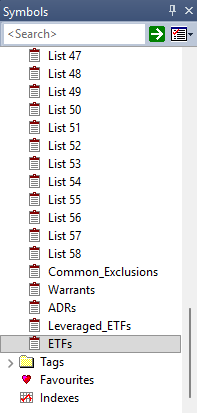
Notice I put these at the bottom of the list rather than the top.
That's so they don't clutter the watchlists I use daily for trading or testing purposes.
I treat these automatically maintained ones as a group, and I can simply scroll all the way down when I want to access them.
-Dave
P.S. Are you sick of second-guessing yourself every time you click buy or sell? Trade with conviction using MabeKit.