How to Exclude Earnings in a Strategy
By Dave Mabe
Yesterday, I shared how to filter for earnings names, but what if you want to do the opposite?
Some strategies specifically look for stocks that are moving outside of earnings.
So how can you set up a filter to exclude earnings names from your strategy?
There's a clever way to do this in Trade-Ideas.
Each filter in TI has a minimum value and a maximum value, both optional.
Normally, the minimum value is less than the maximum value.
For example, if you want to include stocks between $10 and $20, you'd specify 10 for the minimum and 20 for the maximum.
But what if you want to exclude stocks between $10 and $20 while including everything else?
To do this, you'd use 20 for the minimum value and 10 for the maximum value.
Trade-Ideas does the inverse in this case.
To apply this to earnings, you'd do the inverse of what I mentioned yesterday:
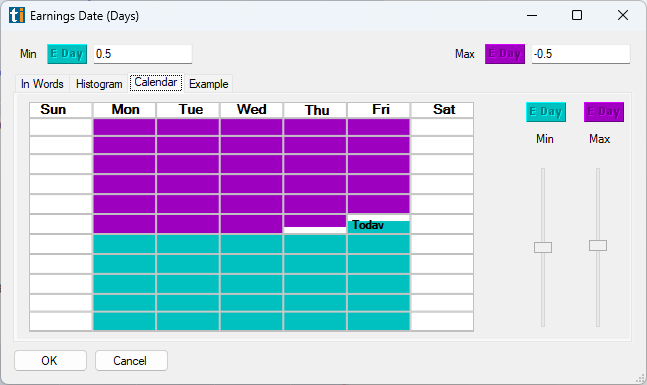
Notice how the calendar view gives you immediate feedback as you adjust the min and max values.
There is a slight catch with this, though.
Unlike the Price filter, the Earnings Date filter can have NULL values.
And when you include values in the min or max fields for a filter, NULL values are excluded, which is not what we want in this case.
Tomorrow, I'll share a simple fix for this using a Custom Formula.
Stay tuned.
-Dave
P.S. Wish you could backtest your ideas - without spending months learning to code? Get the strategy included in the Amibroker AFL Course Get Instant Access