Comparing Trade-Ideas and Amibroker Details
By Dave Mabe
Here's a question from long-time MabeKit user Mugu M. (name used with permission, edited lightly for clarity)
Mugu M:
I have the change in the 1-minute column from MabeKit coming up as highly predictive for a strategy I’m backtesting.
However, when I apply the constraints to the Trade Ideas Alert config window, I get no stocks that satisfy the criteria.
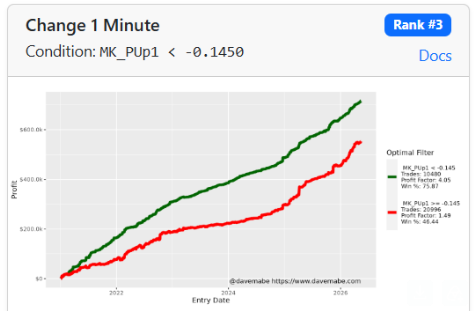
Here is the Strategy Cruncher suggestion:
I also notice that the calculation of the change in 1 Minute sometimes does not match between my Amibroker CSV and Trade Ideas.
Please check if I’m missing something- there’s easily 33% of trades where the column is < 0, but I don’t get a list on the Trade-Ideas window for the recent dates test.
Dave:
Trade-Ideas can generate alerts based on ticks - i.e., "inside the bars".
Amibroker (normally) backtests on 1-minute bar data.
This can cause differences in values on small increments due to the candle bar boundaries.
It's important to understand the differences/capabilities of the two platforms to get the best use out of both of them.
Here's a useful exercise to do a side-by-side comparison for a specific example that should help illustrate the difference clearly.
Pick a recent trade in the backtest, let's say it's AAPL from yesterday.
Use the Stocks Like This tool to select some alerts that frequently appear during the time of the trade.
If the trade occurred at, say, 9:35am, choose 9:30am for the start time and 10 minutes for the duration (like this).
Choose a few of the alerts that appear most frequently during this window and create an alert window with them selected.
On the Symbol Lists tab in the TI Alert window, choose Single Symbol and type AAPL.
Add the Change in 1 Minute column and any other columns you use and might find interesting.
Then do a History on the window for the time period associated with the trade.
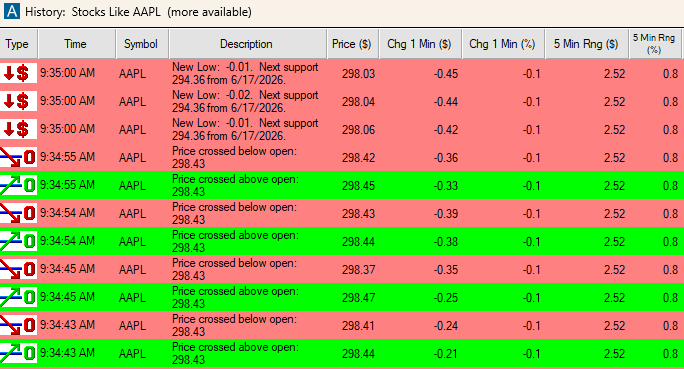
You'll see something like this - basically a view into the Trade-Ideas database for AAPL during that period:
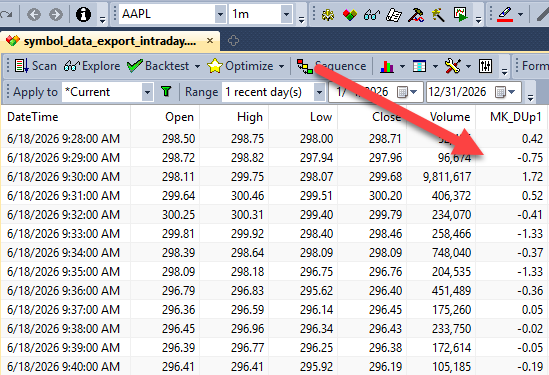
Now go to Amibroker and do an exploration with Filter = 1 to show all bars and use AddColumn to add whatever columns you'd like to see:
This should give a great way to understand the difference in the platforms fully, so you can get the most value from each of them.
-Dave
P.S. Here's a quote from MabeKit user Scott J., who recently went live with some strategies he created with the Cruncher: "The Cruncher gives answers quickly and can run a lot of different scenarios. It would often push the profit factor into the 1.6 to 2.0 range. These are really simple strategies. It’s nothing complex. The Strategy Cruncher added the edge.” - Scott J. Get Instant Access to MabeKit